Quick answer: The Apollo Solo is the smaller, cheaper Universal Audio interface and the Apollo Twin is the larger one with more inputs and processing. Pick the Solo for one vocalist recording one source at a time. Pick the Twin if you need more inputs or more UAD processing. If you do not need UAD plugins while you record, a Focusrite Scarlett 2i2 (4th Gen) costs less and records a single vocal very cleanly. Check the makers' sites for current models and prices.
This page is part of our complete Logic Pro vocals guide, which walks through the whole vocal chain from recording to space and presets.
Choosing hardware? Read our audio interface guide for singers for what to look for and three interfaces worth considering.
Model lineups and prices change. Treat the details below as a guide and confirm them on the maker's site before you buy.
Intro to Apollo Audio
The Universal Audio Apollo series has revolutionized music production, offering unmatched audio quality and flexibility.
From its pristine preamps to its seamless integration with UAD plugins, Apollo has become a staple in professional and home studios alike.
For musicians, producers, and sound engineers, understanding the nuances between models like the Apollo Solo and Apollo Twin is crucial for optimizing their setup to match their creative needs.
This guide will help you navigate the choices and uncover the possibilities made possible through Apollo plugins.
Apollo Sound Card: The Heart of Your Studio
The Apollo sound card is the core of your studio, delivering unparalleled audio fidelity. It's known for its crystal-clear preamps, real-time UAD plugin processing, and versatile connectivity options.
Each Apollo model caters to different needs, from the compact Solo, perfect for singer-songwriters, to the more expansive Twin, ideal for producers seeking more I/O and duo-core processing.
Features and Benefits:
Superb Audio Quality: Apollo interfaces boast industry-leading converters for pristine sound.
Real-Time UAD Processing: Apply UAD plugins while recording, with near-zero latency.
Unison Technology: Enjoy emulations of classic preamps for a rich, analog sound.
Different Models and Their Capabilities:
Apollo Solo: Offers a single SHARC processor for UAD plugin processing, ideal for solo projects.
Apollo Twin: Steps up with duo-core processing for more plugin power and additional I/O for expanded studio setups.
Choosing the right Apollo model depends on your project needs, studio size, and the level of plugin processing required.
Apollo Solo: Compact Powerhouse for Solo Artists
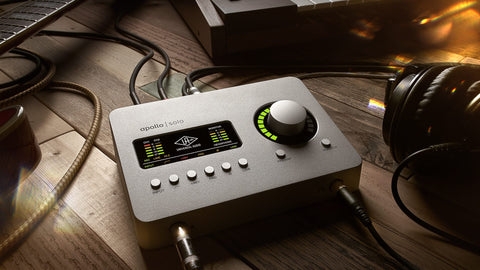
The Apollo Solo is a compact audio interface designed for solo artists and musicians. It's powered by Universal Audio's renowned preamps and UAD-2 processing, offering studio-quality recordings in a portable package.
The Solo features a single high-quality Unison mic preamp, real-time UAD processing for recording through classic audio gear emulations, and an easy-to-use design ideal for singer-songwriters and mobile producers.
Key Features:
Unison Preamp: Offers classic analog tones from Neve, API, Manley, and more.
UAD-2 Processing: Real-time processing allows for recording with near-zero latency.
Compact Design: Perfect for desktop studios and on-the-go recording.
Pros:
- Exceptional audio quality in a portable unit.
- Real-time UAD plugin processing enhances recordings.
- Easy integration with major DAWs for seamless production.
Cons:
- Limited inputs/outputs may not suit larger projects.
- Requires Thunderbolt connection, limiting compatibility with some computers.
The Apollo Solo is an excellent choice for solo artists seeking professional audio quality in a compact, portable interface.
Its Unison preamp and UAD-2 processing offer unparalleled sound for recordings, making it ideal for home studios and musicians on the move.
While its I/O limitations may not suit every project, its performance and quality are unmatched in its class.
Also Read: The Best PC Soundbars and Speakers
Apollo Twin: The Next Step in Professional Recording

The Apollo Twin takes professional recording up a notch from the Apollo Solo, offering a more robust set of features for musicians and producers seeking to expand their studio capabilities.
It comes with two Unison-enabled mic preamps, allowing for richer, more detailed recordings, and includes built-in UAD-2 processing for real-time tracking with vintage compressor, EQ, and reverb plugins.
Its expanded connectivity options make it suitable for more complex setups.
Key Features:
Two Unison Mic Preamps: Capture detailed recordings with emulations of classic preamps.
UAD-2 Processing: Use UAD plugins in real-time without taxing your computer's CPU.
Expanded I/O: More inputs and outputs for versatile recording setups.
Pros:
- Superior sound quality with two Unison preamps.
- Greater flexibility and connectivity for multi-instrument recording.
- Includes a comprehensive suite of UAD plugins.
Cons:
- Higher price point than the Apollo Solo.
- Requires Thunderbolt connection, which may not be available on all PCs.
The Apollo Twin is an exceptional choice for serious musicians and producers looking to elevate their recording quality and flexibility.
With dual Unison preamps and UAD-2 processing, it offers a significant upgrade in functionality over the Apollo Solo.
Ideal for those with more complex recording needs or who desire the flexibility to expand, the Twin balances performance with portability, making it a powerhouse for studio and mobile recording alike.
Apollo Solo vs Apollo Twin: Which One Is Right for You?
Choosing between the Apollo Solo and Apollo Twin depends on your specific music production needs, focusing on performance, connectivity, and price.
Performance: The Apollo Solo is perfect for solo musicians and producers, with two Unison mic preamps and a single DSP core for UAD plugins. The Apollo Twin X also has two Unison preamps, but adds DUO or QUAD core processing, higher-grade converters and optical expansion for more inputs.
Connectivity: Solo suits simpler setups with its more limited I/O options, making it highly portable. Twin offers expanded connectivity, accommodating more instruments and outboard gear, perfect for larger projects.
Price: Apollo Solo is more budget-friendly, appealing to beginners or those with straightforward recording needs. Apollo Twin, while pricier, is an investment in its advanced features and flexibility.
Making the Choice: If you're a solo artist or producer working with a simpler setup, the Apollo Solo offers incredible value and quality. However, if you need more inputs, plan to record multiple instruments simultaneously, or want more UAD processing power, the Apollo Twin is worth the investment. Consider your current and future recording needs to make the best choice for your studio.
Apollo Solo vs Apollo Twin vs Focusrite Scarlett 2i2
Short answer: All three record one vocal cleanly. The Apollo units add UAD plugins that run on the interface, so you can record through a compressor or preamp emulation with almost no delay. The Scarlett 2i2 has no onboard plugin processing, but it costs less and helps beginners set safe levels.
| Apollo Solo | Apollo Twin X | Scarlett 2i2 (4th Gen) | |
|---|---|---|---|
| Mic preamps | 2 Unison | 2 Unison | 2 |
| Plugins on the interface | Yes, 1 DSP core | Yes, DUO or QUAD core | No |
| Expansion | None | Optical (ADAT) for more inputs | None |
| Connection | Thunderbolt or USB-C version | Thunderbolt | USB-C, bus-powered |
| Level help | Manual gain | Manual gain | Auto Gain and Clip Safe |
| Price (maker's US list, October 2026) | See Universal Audio | See Universal Audio | $239.99 |
Who each one fits
Scarlett 2i2: You record your own vocals at home, mix with plugins in Logic Pro or GarageBand, and want the lowest cost. Auto Gain and Clip Safe stop most clipped takes. This is the interface most beginners should start with.
Apollo Solo: You want to record through UAD preamp and compressor emulations, and you work alone with one or two sources at a time.
Apollo Twin X: You run many UAD plugins at once, track a duo or a band, or plan to add more inputs later through the optical port.
A vocal preset works the same on all three, because the preset runs in your DAW, not on the interface. Compare prices for the Scarlett 2i2 4th Gen on Amazon.
Also Read: The Vocal EQ Cheat Sheet
Dive into Apollo Plugins: Expanding Your Sonic Palette
Diving into Apollo plugins means exploring Universal Audio's (UAD) vast library. UAD plugins offer high-quality emulations of analog gear, from classic compressors to vintage EQs.
They're designed to integrate seamlessly with Apollo sound cards, providing low-latency processing for recording and mixing. UAD plugins enhance your music production with authentic analog sounds without needing physical hardware.
This expands your sonic palette, allowing you to craft unique sounds and textures in your music.
The Best Apollo Plugins
UAD Essentials Edition Plugin
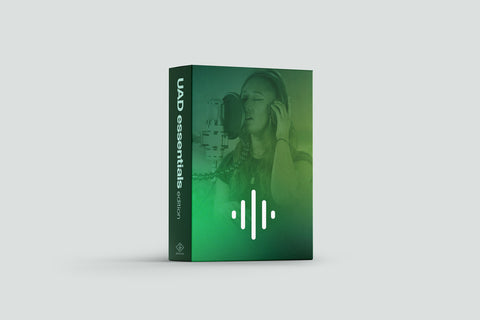
The UAD Essentials Edition is a curated collection of Universal Audio's most popular plugins.
This bundle provides a solid foundation for mixing and mastering, featuring essentials like the LA-2A Classic Leveler, 1176LN Classic Limiting Amplifier, and Pultec EQP-1A EQ.
It's designed for newcomers to UAD plugins, offering an affordable entry point without compromising on quality.
Key Features:
Classic Emulations: Includes industry-standard analog gear emulations, ensuring professional sound quality.
Versatility: Covers a range of processing needs, from compression to EQ, suitable for various music genres.
Integration: Seamlessly works with Apollo interfaces, taking advantage of real-time processing with minimal latency.
Pros:
- High-quality analog sound emulations enhance mixes.
- Affordable package for beginners.
- Low-latency performance ideal for real-time tracking and mixing.
Cons:
- Limited selection compared to full UAD library.
- Requires UAD hardware for operation.
The UAD Essentials Edition is an excellent starting point for music producers looking to explore the rich sound of UAD plugins.
While it offers a more limited selection than the complete library, it provides essential tools for high-quality mixing and mastering at an accessible price point.
1176 Classic Limiter Collection Apollo Plugin
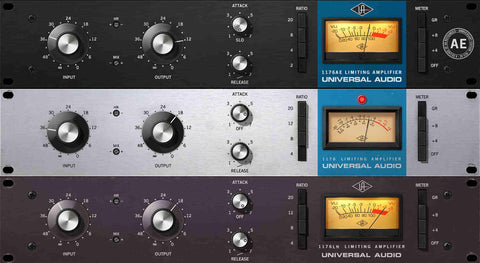
The 1176 Classic Limiter Collection offers a meticulous emulation of the original 1176LN FET compressor.
Renowned for its fast attack and unique all-button mode, this plugin collection captures the nuances of three distinct versions: Rev A, Rev E, and the rare AE. It's an essential tool for adding punch and presence to vocals, drums, and more.
Key Features:
Authentic Emulations: Precisely models the behavior and sound of the vintage hardware units.
Versatility: Suitable for various audio sources, offering everything from subtle compression to aggressive limiting.
Plugin Integration: Works flawlessly with Apollo interfaces for real-time tracking with zero latency.
Pros:
- Provides a wide range of sonic textures, from smooth to aggressive.
- Features multiple versions for greater tonal flexibility.
- Ideal for both mixing and tracking, enhancing everything it touches.
Cons:
- Requires UAD hardware to operate, limiting its accessibility.
- Can be CPU-intensive when used in multiple instances.
The 1176 Classic Limiter Collection is a powerhouse for producers and engineers seeking the aggressive punch and character of the original hardware.
With its detailed emulations and versatile applications, it's a staple in any plugin arsenal, offering the legendary 1176 sound within a digital workflow.
Studer A800 Multichannel Tape Recorder Plugin
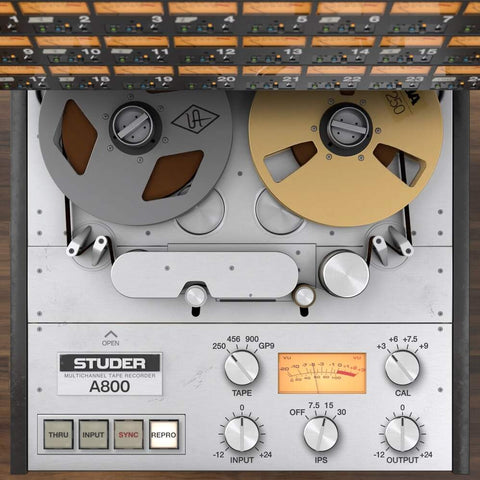
The Studer A800 Multichannel Tape Recorder plugin faithfully recreates the sound of the legendary tape machine known for its cohesive tape saturation and warmth.
It brings the rich, analog tape sound to digital recordings, offering the same depth and harmonic complexity that made the original hardware a studio staple.
Key Features:
Authentic Sound: Meticulously models the Studer A800's unique analog tape qualities.
Versatile Control: Features adjustable tape speed, bias, and calibration levels for customized sound shaping.
Multi-Track Emulation: Simulates the effect of recording to all 24 tracks for true-to-life analog warmth on digital recordings.
Pros:
- Adds analog warmth and depth to digital tracks.
- Flexible settings allow for a wide range of sonic textures.
- Integrates seamlessly with Universal Audio interfaces for real-time processing.
Cons:
- Requires UAD hardware, which may not be accessible to all users.
- Can be resource-intensive, requiring careful management on larger sessions.
The Studer A800 Tape Recorder plugin is an invaluable tool for producers and engineers looking to infuse their digital recordings with the characteristic warmth and saturation of analog tape.
Its detailed emulation and flexible controls make it a go-to choice for adding depth and character to any project.
Want to Save Time? Check out our popular Logic Pro Presets
Integrating Apollo with Your Studio Setup
Integrating an Apollo sound card into your studio setup enhances your music production capabilities significantly. Here's how to make the most of it:
Setup and Installation Tips:
Connect to Power: Start by connecting your Apollo unit to a power source using the provided cable.
Interface Connection: Use a Thunderbolt or USB cable to connect the Apollo to your computer.
Software Installation: Install the Universal Audio software from their website to ensure your Apollo is recognized by your computer.
Optimizing Apollo for Different Recording Environments:
Monitor Management: Use the Console application to manage monitor levels and headphone mixes, ensuring optimal monitoring for each recording environment.
Buffer Size Adjustment: Adjust the buffer size in your DAW to balance between low latency monitoring and system performance.
Input/Output Routing: Configure the I/O settings to match your studio's setup, allowing for flexible signal routing and processing.
By carefully setting up and optimizing your Apollo unit, you can achieve professional-quality recordings in any environment, ensuring your productions sound their best.
Maximizing Apollo's Potential: Tips and Tricks
Maximizing the potential of your Apollo interface can elevate your music production. Here are tips to unlock its full capabilities:
Advanced Usage Scenarios:
Unison Technology: Use Unison-enabled preamps for precise impedance matching, offering analog-like warmth and depth.
Parallel Processing: Apply parallel compression or EQ in real-time using Console, enhancing dynamics without latency.
Virtual Patch Bay: Route signals through the Console app for creative signal processing chains.
Getting the Most Out of Apollo Plugins:
Demo Before Buying: Utilize the 14-day demo period for plugins to find what best suits your sound.
Custom Presets: Create and save your own presets within plugins for quick setup in future projects.
Mix in Real-time: Use Apollo’s near-zero latency to mix with plugins in real-time, providing instant auditory feedback.
If you record vocals in Logic Pro, you can load vocal chain presets for Logic Pro instead of building them from scratch.
By exploring advanced features and optimizing plugin use, Apollo users can push their music production to professional levels, making every project sound better.
Concluding the UAD Apollo Review
The Apollo series has truly revolutionized modern music production. Its high-quality sound, combined with the power of UAD plugins, has set a new standard in the industry.
For artists and producers alike, Apollo interfaces offer unparalleled audio fidelity, making them a cornerstone in countless studios worldwide.
The integration of Apollo's hardware with its meticulously modeled plugins provides a seamless, analog-like recording experience that's hard to match.
Choosing the right Apollo model depends on your specific needs and workflow.
Whether you're a solo artist requiring the portability and simplicity of the Apollo Solo or a professional studio looking for the advanced features and connectivity of the Apollo Twin or Apollo x series, there's an Apollo interface designed for you.
Remember, it's not just about the specs; it's about how the interface fits into your creative process and helps bring your musical visions to life.
With Apollo, you're not just choosing a piece of hardware; you're investing in a legacy of sound excellence that will elevate your music for years to come.
How an interface fits into a vocal chain
The interface sets how clean your recording is. Your vocal chain then shapes it. A better interface does not replace a good room, mic placement or a sensible chain. Spend first on the mic and room, then the interface.
After recording, use a chain such as the one in Logic Pro vocal chain, step by step. Our free Toronto Warmth preset gives you a finished chain to start with, and our Logic Pro and GarageBand presets cover more styles.
Apollo Solo vs Apollo Twin X: the short answer
Apollo Solo vs Apollo Twin X comes down to inputs and processing. The Twin X has two mic preamps and a choice of Duo or Quad processing, so it suits two sources at once or heavier UAD plugin use while you track. The Solo suits one singer recording one source at a time. Specs change by model year, so check Universal Audio's site before you buy. Whichever you pick, your vocal chain runs in your DAW, for example one of our Logic Pro vocal presets, which need no UAD hardware.
Frequently asked questions
What is the difference between Apollo Solo and Apollo Twin X?
The Twin X is the larger interface. It has two Unison mic preamps and a choice of Duo or Quad core processing. The Solo has one Unison mic preamp, an instrument input and a single-core processor. Check Universal Audio's site for current specs.
Is the Apollo Twin worth it over the Solo for one vocalist?
If you record one vocal at a time, the Solo covers it. The Twin pays off when you need two mics at once or want to run more UAD plugins while you record.
Is the Apollo Solo enough for vocals?
For one singer recording one vocal at a time, yes. The Twin helps when you need more inputs.
Do I need an Apollo to use vocal presets?
No. Vocal presets run in your DAW. Any decent interface works.
Is the Apollo Solo better than a Focusrite Scarlett?
Only if you will use UAD plugins while you record. For a single vocal mixed with plugins in your DAW, the Scarlett 2i2 is enough and costs less.
Does the Scarlett 2i2 work with GarageBand and Logic Pro?
Yes. It is class compliant on Mac, so GarageBand and Logic Pro see it without extra setup, and vocal presets work the same as with any interface.
What matters more, the interface or the mic?
The mic and the room usually change the sound more. Start there.
Back to the full guide: Logic Pro vocals, from recording to presets. Related: HOW TO RECORD VOCALS WITH APOLLO TWIN IN LOGIC + PLUGINS and The Best Wireless Microphones for Singers.